
Hooking up with LiveView: stateful widgets with function components




Subscribe to receive Elixir news to your inbox every two weeks.

Expand your skills
Download free e-books, watch expert tech talks, and explore open-source projects. Everything you need to grow as a developer - completely free.
Reusable Phoenix widgets without the usual pain. See how a pattern for building stateful, interactive, real-time components that stay fully self-contained and don’t leak complexity into the parent LiveView.
The Problem
Working with clients on their Phoenix applications, I kept running into the same need: a self-contained, reusable component that manages its own state, handles its own events, and reacts to real-time updates — without requiring the parent LiveView to know anything about its internals.
Something like a widget.
Think of a chat window that receives messages from other users, a notification pane with live updates, or a calendar that reacts to new bookings. Such a widget operates on two input streams: user interaction and process messages. These components are used across many views, and they all share the same core requirements:
- Stateful - they need to remember things
- Interactive - they respond to user input (
handle_event) - Message-driven - they react to external messages (
handle_info, PubSub) - Params-aware - can access the URL state
- Self-contained - require no additional wiring in the parent LiveView
- Isolated - multiple instances can exist on the same page without interfering with each other
Example of dashboard with multiple widgets:
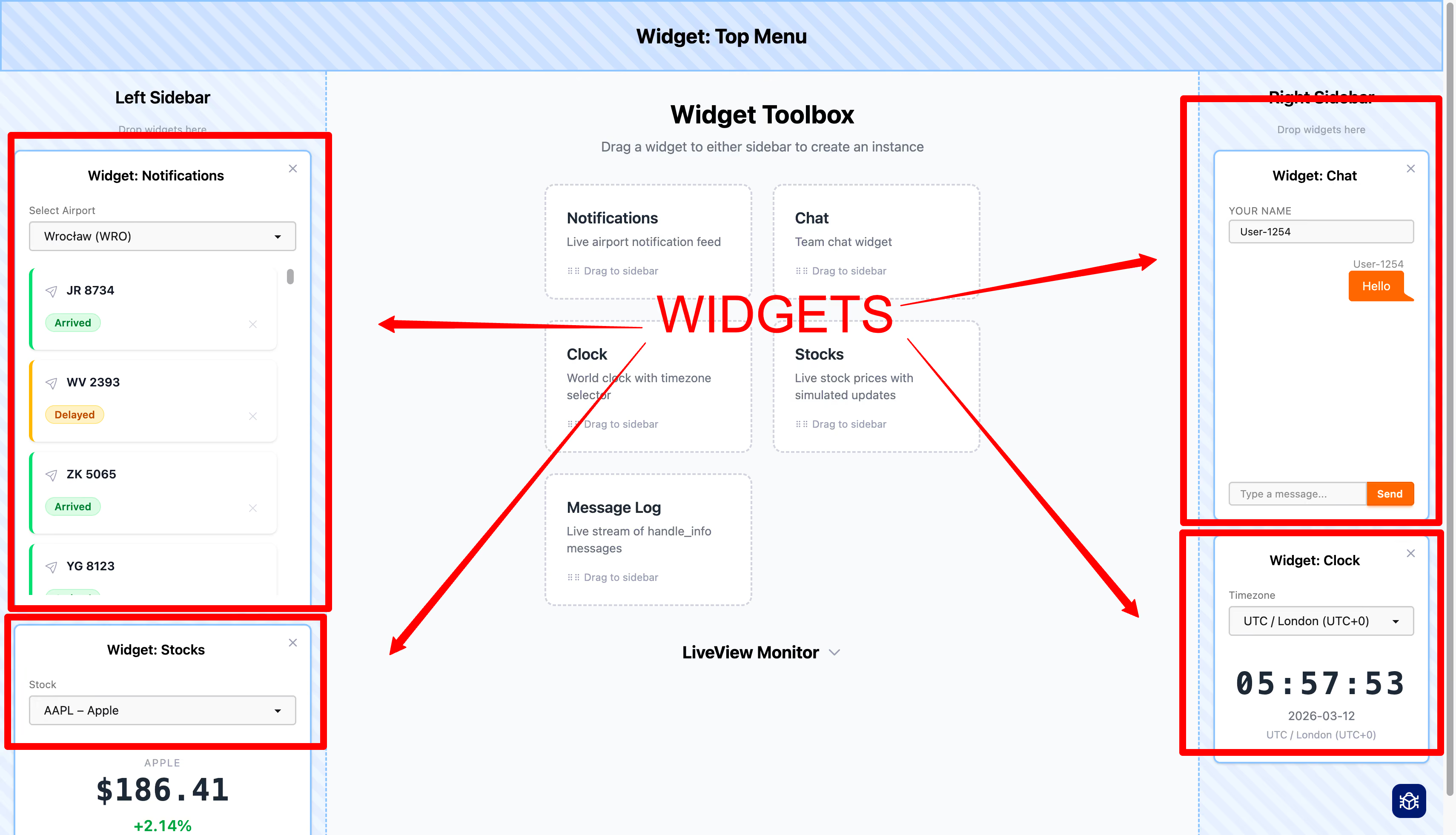
Getting all of these right with Phoenix's built-in abstractions is surprisingly tricky. This article shows a pattern that delivers all of them.
Why the Obvious Approaches Fall Short?
LiveComponents
LiveComponents look like the natural fit - stateful, event-handling, isolated. But they have two critical limitations.
First: no handle_info. Any PubSub subscription has to live in the parent LiveView, which then forwards messages to the component via send_update/3. The parent suddenly needs to know about its children's internals.
Second: no handle_params. When the URL changes, the LiveView receives the new params - but the component doesn't. If the component needs to react to URL state, the parent must explicitly extract and forward the relevant params. That's more knowledge the parent shouldn't need.
LiveComponents also store their state in a separate internal location, making debugging harder - you can't inspect socket.assigns and see the full picture. And inter-component communication requires complex routing through the parent; components cannot talk to each other directly.
Embedded LiveViews
Embedded LiveViews (live_render/3) seem to have it all: self-contained state, event handling, and handle_info. But everything else gets worse.
They cannot access the parent's URL params. Each embedded LiveView is a fully separate process with its own URL lifecycle, so it can only see what's passed through session - which accepts only strings. Coordinating around URL state means serialising it into session data and duplicating it across processes.
On top of that: a separate BEAM process per widget, string-only initialisation, complex crash handling, and inter-widget communication done by passing PIDs through strings stored in a session - yes, they end up in cookies in the browser.
I inherited a codebase built this way - five embedded LiveViews on a single page, all coordinating via PID-in-session. My first task was to replace it. That experience is what led me to the pattern described here.
The Pattern: Hooked Function Components
I'd say hooks are more powerful and provide a better foundation than LiveComponents for building new abstractions.
- José Valim, Elixir Forum
The key principle in this design is that the LiveView's socket is the single source of truth. The pattern combines three elements, encapsulated in a single Widget Module:
- State is defined in a dedicated
%struct{}and eventually stored directly in the parent LiveView'ssocket.assigns— there is no hidden internal state, no separate process, no session serialisation. - LiveView Hooks — the widget plugs into the parent's lifecycle through
attach_hook/4, intercepting events and messages before they reach the LiveView's own handlers. A single hook can serve countless instances of the component. - Function Component is responsible for rendering. It is a single pure function (
render/1) that transforms the struct into HTML.
All three live inside a single Widget Module with a minimal public surface.
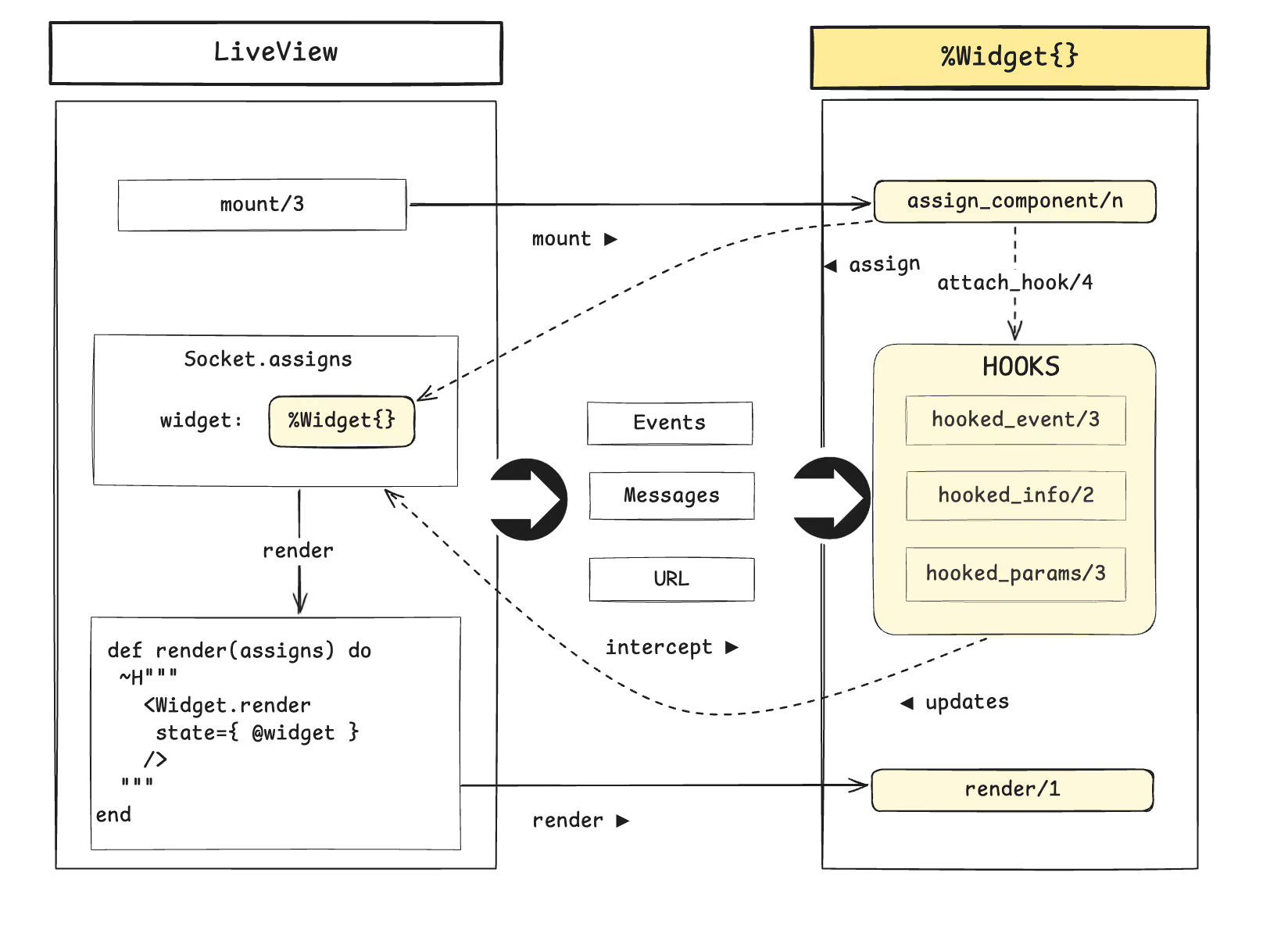
Here is a detailed breakdown:
💡 Widget hooks should only modify the state of the widget instances. Since hooks plug directly into the LiveView lifecycle, they have access to the full socket assigns - but modifying anything outside their own state breaks decoupling and makes debugging significantly harder - technically possible, but a clear code smell.
LiveView Hooks — How It Works
The function attach_hook/4 is the core mechanism here. It lets a component plug into the parent LiveView lifecycle - in particular event and message handling pipelines. This approach allows interception of the following LiveView lifecycle events:
:handle_params:handle_event:handle_info:handle_async:after_render
The component can now intercept calls before they reach the LiveView's own handlers. Browser events hit the hook callbacks first. If the widget recognises them, it handles them and halts propagation; otherwise, they pass through to the LiveView. Events such as URL params and PubSub messages follow the same path via their respective hooks. The callback must return either {:halt, socket} to stop propagation, or {:cont, socket} to pass the event to the next handler. The following diagram illustrates these two scenarios:
Browser submit "chat-widget:send"
    │
    ▼  hooked_event — widget handles it  → :halt  (stops here)
    ✗  handle_event — LiveView never reached

Browser click "some-other-event"
    │
    ▼  hooked_event — catch-all          → :cont  (passes through)
    │
    ▼  LiveView.handle_event — LiveView handles it
The widget intercepts its own events and messages without the parent knowing. The catch-all :cont passes unrecognised events through so the parent can still handle its own events normally.
Example: Building the Chat Widget
Let's build an advanced chat widget to dive deeper into the design and tricks of this pattern.
Chat widget functional and non-functional requirements:
- R/1: Send and receive messages in a chat room.
- R/2: Set the chat room via URL params.
- R/3: New messages from other users arrive in real time via PubSub.
- R/4: Small memory footprint - do not store the messages in socket. Use LiveView's
streamwhen possible. - R/5: Allow multiple instances of the widget within the same LiveView.
It should look somewhat like this
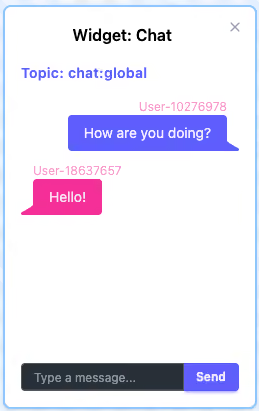
1. State: The Struct
# chat_widget.ex
defstruct [:key, :username, :messages, :topic]
This struct is the widget's state. It lives in socket.assigns under a caller-chosen key and contains all the data the component will need:
keyrecords that key so the widget can locate itself later in the socket (needed for multiple instances).usernameis the current user's display name.messagesholds a reference to the LiveView stream, which we'll cover shortly.topicis the PubSub topic the widget subscribes to handle incoming messages.
In the proposed pattern, the widget component adheres to unidirectional data flow - it cannot use any data that is outside of the state.
2. Pure Rendering
In the parent template, the component is used with only a single attribute - the state struct:
# dashboard_live.ex
def render(assigns) do
  ~H"""
  <div>
    <h3>Widget: Chat</h3>
    <ChatWidget.render state={@chat} />
  </div>
  """
end
The render/1 function is a plain function component - just a transform from state to HTML:
# chat_widget.ex
# Function Component

def render(assigns) do
  ~H"""
	  <!-- [...] -->
	 <!-- Messages list -->

      <ul phx-update="stream" id={"chat-widget-#{@state.key}"}>
        <li :for={{dom_id, message} <- @state.messages} id={dom_id}>
            <div>{message.username}</div>
            <div>{message.content}</div>
        </li>
      </ul>

	<!-- Send Message Form -->

    <form phx-submit="chat-widget:send">
	  <!-- Widget key as a hidden input -->
      <input
	      type="hidden" name="chat-widget-key"
	      value={@state.key}
      />
      <div>
        <input
          type="text"
          name="message"
        />
        <button type="submit">
          Send
        </button>
      </div>
    </form>
  </div>
  """
end
Things to pay attention to:
- Events are namespaced (
"chat-widget:send") to avoid collisions with the parent LiveView's own events. - The assign key travels with every event as a hidden field or
phx-value-*attribute, so the hook knows which widget instance (state) to update when multiple widgets share a page. - We render from a stream reference stored in the widget's state:
@state.messages.
3. Mounting
The zero-configuration requirement is enforced by assign_component/2 (you can choose any other name for this function, though), which sets up the state and plugs the hooks into the LiveView:
# chat_widget.ex
  def assign_component(socket, key, opts \\ []) do
    state = %ChatWidget{
      key: key,
      username: opts[:username] || generate_username(),
      messages: [],
      topic: opts[:topic] || "chat:global"
    }

    socket
    |> maybe_subscribe(state.topic)
    |> assign(key, state)
    |> reset_messages(key)
    |> maybe_attach_hooks()
  end
Let's check what is happening here:
- The
socketargument is the parent LiveView's socket - the single source of truth. optsallows the caller to pass configuration such as:username.maybe_subscribe/2subscribes the LiveView process to the PubSub topic - it checks for an existing subscription first, so mounting a second widget on the same topic doesn't double-subscribe.reset_messages/2initialises the LiveView stream and syncs it into the widget state struct.maybe_attach_hooks/1is a private function that attacheshandle_event,handle_info, andhandle_paramshooks to the parent LiveView. We'll look at it next.
From the parent LiveView's mount/3:
# dashboard_live.ex
socket |> ChatWidget.assign_component(:chat)
That's all the parent needs. No event handlers. No handle_info. No awareness of how the widget works internally.
Multiple instances can be mounted by calling assign_component/2 multiple times with different keys:
# dashboard_live.ex
socket
|> ChatWidget.assign_component(:chat_left)
|> ChatWidget.assign_component(:chat_right)
4. Hook Attachment
Before we look at event handling, we need to understand how hooks get wired up. Hooks are attached once per LiveView, regardless of how many widget instances are mounted. Our helper maybe_attach_hooks/1 counts existing instances in the LiveView's socket and skips hook attachment if hooks are already in place:
# Attaches shared hooks when the first instance is added.
defp maybe_attach_hooks(socket) do
  if single_instance?(socket) do
    socket
    |> LiveView.attach_hook("chat_widget:event", :handle_event, &hooked_event/3)
    |> LiveView.attach_hook("chat_widget:info", :handle_info, &hooked_info/2)
    |> LiveView.attach_hook("chat_widget:params", :handle_params, &hooked_params/3)
  else
    socket
  end
end

# Checks if there is exactly one widget instance in assigns.
defp single_instance?(socket) do
  Enum.count(socket.assigns, fn {_, v} -> match?(%__MODULE__{}, v) end) == 1
end
5. Terminating
The single set of shared hooks handles events from all instances. When the last instance is removed, hooks are detached:
  # Removes a chat widget instance from the socket.
  def detach_component(socket, key) do
    state = socket.assigns[key]
    socket
    |> maybe_detach_hooks()
    |> assign(key, nil)
    |> maybe_unsubscribe(state.topic)
  end

  # Detaches shared hooks when the last instance is removed.
  # The assign is still present at call time, so single_instance? == true means this is the last.
  defp maybe_detach_hooks(socket) do
    if single_instance?(socket) do
      socket
      |> LiveView.detach_hook("chat_widget:event", :handle_event)
      |> LiveView.detach_hook("chat_widget:info", :handle_info)
      |> LiveView.detach_hook("chat_widget:params", :handle_params)
    else
      socket
    end
  end
Let's be frank here: In most common Liveview workflows you will probably never be detaching a component unless you aim to be able to dynamically juggle components on the page.
6. Event Handling: Sending Chat Messages
Let's look at how user interactions are handled. Here is an example of what happens when the user clicks the "Send" button:
# Sends a message when the form is submitted.
defp hooked_event("chat-widget:send", %{"message" => content, "chat-widget-key" => chat_widget_key}, socket)
     when content != "" do
  # to_existing_atom/1 is safe here — the atom was already created by assign_component/3
  key = String.to_existing_atom(chat_widget_key)

  %ChatWidget{} = state = socket.assigns[key]

  ChatContext.send_message(state.username, content, state.topic)

  {:halt, socket}
end

defp hooked_event(_event, _params, socket), do: {:cont, socket}
The hook callback signature is similar to the handle_event/3 we would use in a LiveView directly. What changes is the return structure: {:halt, socket} or {:cont, socket}.
7. Real-time Updates: PubSub Messages
Context function Chat.send_message/3 broadcasts the message via PubSub. Because the LiveView is subscribed the same process receives the message back as {:new_message, msg}. The info hook picks it up and inserts it into every chat widget's stream whose topic matches:
# Inserts a new message into every active chat widget instance stream.

defp hooked_info({:new_message, %Message{} = message}, socket) do
  updated_socket =
    for {_key, %ChatWidget{} = state} <- socket.assigns,
        state.topic == message.topic, # Filter on topic
        reduce: socket do
      socket ->
        insert_message(socket, state, message)
    end

  {:cont, updated_socket}
end

defp hooked_info(_msg, socket), do: {:cont, socket}
The for comprehension filters assigns by struct type and by matching topic, so only widget instances subscribed to the relevant topic receive the message.
The actual stream insertion is delegated to a private insert_message/3 helper (which calls stream_insert followed by sync_messages) to keep the comprehension body readable.
The result {:cont, socket} lets the message propagate to the parent LiveView, which might want to react - for example, to show a notification badge when the chat is minimised.
💡 We should never stop the propagation of process messages. We never assume our widget is the only address of the message. Other widgets on the same page might also be interested in the message.
That is why it is important to always pass messages down the hook chain to the LiveView.
PubSub {:new_message, message}
    │
    ▼  hooked_info — widget inserts into all streams  → :cont
    │
    ▼  handle_info — LiveView can also react
8. URL Params: Chat Room
The :topic field can be driven by the URL. Navigating to /dashboard?topic=chat:elixir switches all widget instances to a different chat room automatically.
The handle_params hook is already registered alongside the others in maybe_attach_hooks/1. The params hook receives params, uri, and socket - the same signature as handle_params/3 in a LiveView:
defp hooked_params(%{"topic" => topic}, _uri, socket) do
  updated_socket =
    for {key, %ChatWidget{} = state} <- socket.assigns, reduce: socket do
      socket ->
        Chat.unsubscribe(state.topic)

        socket
        |> assign(key, %{state | topic: topic})
        |> reset_messages(key)
    end

  Chat.subscribe(topic)
  {:cont, updated_socket}
end

defp hooked_params(_params, _uri, socket), do: {:cont, socket}
When the topic changes, each widget instance is updated with the new topic value and its stream is reset (clearing old messages). The widget also subscribes to the new PubSub topic so incoming messages start flowing in.
Because handle_params fires on every navigation — including after the initial mount - the widget picks up the topic on first load. The parent LiveView doesn't need a handle_params at all unless it has its own reasons to care about the URL.
LiveView navigates to /chat?topic=chat:elixir
    │
    ▼  hooked_params — updates topic, resets streams, re-subscribes  → :cont
    │
    ▼  handle_params — LiveView can also react (e.g. update page title)
9. Stream Integration
LiveView streams live in socket.assigns.streams, separate from regular assigns. As we saw, the render/1 function only receives a single assign - @state, so the stream reference must be copied into the struct after every stream operation:
# Syncs the stream reference into the widget state.
defp sync_messages(socket, key) do
  update(socket, key, fn %ChatWidget{} = state ->
    %{state | messages: socket.assigns.streams[key]}
  end)
end
Let's check what is happening here:
sync_messages/2is a helper called after everyreset_messages/2andinsert_messages/3. It copies the stream reference fromsocket.assigns.streamsinto the widget struct. From the template's perspective, the stream is just another field on the struct.- For convenience, we use the same key to store the state in
assignsand the stream inassigns.streams:
# socket.assigns
%{
  chat: %ChatWidget{key: :chat, username: "User-42", messages: ...},
  #...
  streams: %{chat: [{"messages-uuid-1", %Message{...}}, ...]},
  ...
} = socket.assigns
Trade-off: Stream Pruning
Storing the stream in the widget struct seems elegant, but it comes with a memory trade-off.
Streams are stored separately from regular assigns for a reason: memory efficiency. After each render, LiveView prunes streams - clearing accumulated inserts and deletes so the garbage collector can reclaim the data. This is why streaming 10,000 rows doesn't keep them in server memory permanently.
# LiveView Stream Pruning

							 LiveView
                         after_render prune
                                │
  @streams[:chat]               ▼
  ┌──────────────┐     ┌──────────────┐
  │ inserts: [..]│ ──► │ inserts: []  │  ✓ pruned
  │ deletes: [..]│     │ deletes: []  │
  └──────────────┘     └──────────────┘
Copying the stream reference into our struct doesn't duplicate data - BEAM uses immutable references, so state.message_stream and socket.assigns.streams[:chat] point to the same underlying data. The problem is what happens after the render:
- LiveView's
after_renderhook prunessocket.assigns.streams- inserts and deletes are cleared. - Our struct copy at
socket.assigns.chat.message_streamis not touched by this pruning. - The stale stream data in the struct stays in memory until the next hook event calls
sync_stream.
# Widget Stream
							LiveView
						after_render prune
                                │
@chat.message_stream            ✗
  ┌──────────────┐     ┌──────────────┐
  │ inserts: [..]│ ──► │ inserts: [..]│  ✗ unchanged
  │ deletes: [..]│     │ deletes: [..]│
  └──────────────┘     └──────────────┘
For a handful of chat messages this is negligible. But with 10,000 initial rows, that data lingers in the LiveView process until the next event triggers sync_stream. If the widget is mostly idle after mount, the unpruned data stays indefinitely.
Adding an after_render hook to prune the struct manually is tempting, but after_render fires on every render —-not just widget-triggered ones. The overhead isn't worth it.
The Fix: Separate Stream from State
The cleaner solution: stop embedding the stream in the struct. Pass it as a separate attribute to the function component:
# dashboard_live.ex — render with separate stream attribute
<ChatWidget.render state={@chat} message_stream={@streams.chat} />
and use the attribute directly in the render/1 function component:
# chat_widget.ex — function component accepting both attributes
def render(assigns) do
  ~H"""
	  <!-- Instead of @state.message_stream -->
      <li :for={{dom_id, message} <- @message_stream} id={dom_id}>

  """
end
Now the stream lives exclusively in socket.assigns.streams where LiveView's pruning works as designed. The sync_stream/2 helper and message_stream struct field are no longer needed.
It's slightly less elegant —- the parent template now references @streams.chat directly - but it ensures correct memory behaviour without workarounds.
Debugging
Because widget state is a plain struct in socket.assigns, there is no hidden internal state. Every tool that works for LiveView debugging works here - LiveDebugger, dbg(), pattern matching in IEx. If the chat widget is misbehaving, socket.assigns.chat is right there to inspect.
An example of my LiveView assigns dump:
%{
  page_title: "Dashboard",
  flash: %{},
  streams: %{...},
  live_action: :index,
  # Chat Widget
  chat: %WidgetWeb.ChatWidget{
    __struct__: WidgetWeb.ChatWidget,
    username: "User-1226",
    key: :widget_9,
    messages: %{...},
    topic: "chat:global"
  }
}
This is a meaningful improvement over LiveComponents, where the internal assigns are stored separately and require knowing where to look.
Since hook callbacks scan socket.assigns to locate widget instances, performance scales linearly with the number of assigns - negligible for typical pages, but worth keeping in mind if a LiveView accumulates hundreds of assigns.
Testing
Because the widget is just functions operating on a socket, testing follows standard LiveView patterns. Mount a LiveView that includes the widget, then use render_click/2, render_submit/2, and assert_push_event/3 as usual. PubSub-driven updates can be tested by broadcasting directly in the test - the widget's hook picks up the message the same way it would in production.
Comparison
How do Phoenix's built-in abstractions stack up against the widget requirements?
Wrapping Up
The general recipe comprises the following:
- A struct in
socket.assignsholds the widget's state assign_component/nsets up state, subscribes to PubSub, attaches hooksrender/1— renders from the struct — no logic, no side effectshooked_event/3intercepts widget-specific events →:halthooked_info/2intercepts PubSub messages, updates state →:contso the parent can also reacthooked_params/3intercepts URL param changes, updates topic, resets streams, and re-subscribes →:cont
The parent LiveView mounts the widget in one line, renders it in one line, and knows nothing else about it. It requires just two lines:
def mount(_params, _session, socket) do
  {:ok, socket |> ChatWidget.assign_component(:chat)}
end

def render(assigns) do
  ~H"""
  <div class="dashboard">
    <ChatWidget.render state={@chat} />
  </div>
  """
end
Want to power your product with Elixir? We’ve got you covered.
Related posts
Dive deeper into this topic with these related posts
You might also like
Discover more content from this category
![Fix Alpine + Phoenix LiveView: 5 Integration Patterns [2025]](https://cdn.prod.website-files.com/6780f4139ab3ae7f7313b0f4/6901b457c96f78ca0a9d7703_Fix%20Alpine%20%2B%20Phoenix%20LiveView_%205%20Integration%20Patterns%20(2025).avif)
If you've tried integrating Alpine with Phoenix LiveView, you've probably hit at least one of these maddening bugs where everything should work, but mysteriously doesn't. The docs say they play nice together. The examples look simple. Yet here you are, debugging phantom state loss and disappearing DOM elements at 2 AM.
Building a backend, extending a team and reviewing architecture call for different Elixir partners. This comparison looks at eight companies, their specializations, client projects and ways of working.

Elixir and its ecosystem is gradually becoming the go-to platform for many web application developers who want both performance and productivity without a tradeoff.